Win32 Disk Imager : Create an exact copy of a removable storage unit and U3 device as a backup, and generate its MD5 hash with this lightweight application
Win32 Disk Imager is designed to write a raw disk image to a removable device or backup a removable device to a raw image file. It is very useful for embedded development, namely Arm development projects (Android, Ubuntu on Arm, etc).
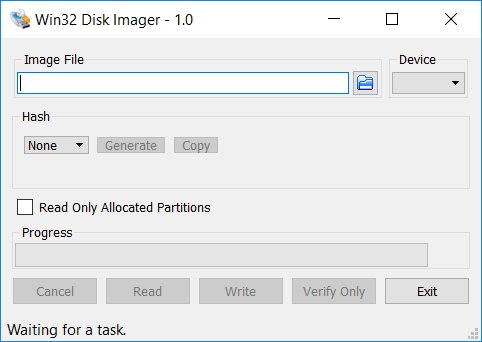
In the eventuality that you are using games or software solutions from CDs or DVDs on a regular basis, then there is a good chance that you have several IMG files that you may want to create backups for. Win32 Disk Imager The program comes with a minimalistic interface that is unlikely to give you any trouble. In fact, the GUI consists of a single window where you can add the image file, select the drive and generate a hash. Whether you are creating a copy or a backup, you can preview the operation thanks to the progress bar located in the lower section of the UI. As previously mentioned, you can also generate MD5 and SHA-1 hash algorithms that you can store and use whenever you need to identify the validity of certain images you created a long time ago. At the same time, the data can come in handy when you backup several USB devices that have the same size as it prevents restoring a different image, and it possible to copy it to the Clipboard for use in another utility.
Win32 Disk Imager release is for Windows 7/8.1/10. It will should also work on Windows Server 2008/2012/2016 (although not tested by the developmers). For Windows XP/Vista, please use v0.9 (
Win32 Disk Imager v0.9).
Warning: Issues have been reported when using to write to USB Floppy drives (and occasionally other USB devices, although very rare). While this has been fixed in v1.0, it is highly recommended that before an image is written to a device, the user should do a Read to a temporary file first. If this fails, please report the failure along with your system information.
Windows 10 64-bit / Windows 10 / Windows 8 64-bit / Windows 8 / Windows 7 64 bit / Windows 7 / Windows Vista 64 bit / Windows Vista / Windows XP 64 bit / Windows XP
Win32 Disk Imager runs on
Windows 10/11
and is available under the
GPLv2
license
— the installer is 11.9 MB.
We’ve catalogued it under
CD/DVD and Hard Disk.
Help fellow users decide. Share your experience with Win32 Disk Imager.