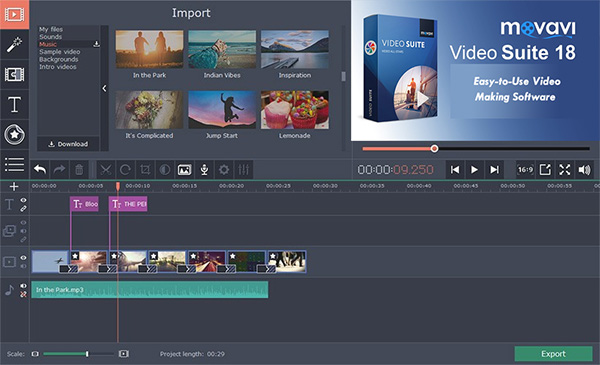
Movavi Video Editor is a powerful yet easy-to-use video processing program for Windows.
Movavi Video Editor is a powerful yet easy-to-use video processing program for Windows. Cut and join video clips with zero quality loss, apply effects and filters, add music, titles, and much more! Movavi s video editing software is intuitive and full of features.Key features include:
- Transfer recordings from photo or video camera to your computer.
- Capture webcam footage, record your voice via microphone.
- Upload video and audio files in any popular format: AVI, MOV, MP4, MP3, WMA, and many others.
- Add photos or any other graphic files.
- Rotate and crop videos, delete unwanted segments.
- Join individual frames or video clips with over 100 stylish transitions.
- Adjust sharpness.
- Improve brightness, contrast, and other colour settings.
- Stabilize any shaky sections.
- Automatically improve video quality with Magic Enhance.
And that s not all... Like special effects? Make your videos spectacular with Movavi Video Editor s special "Hollywood" effects: make a Matrix-style feel with Slow Motion, or transport your friends to another world with Chroma Key!Finally, once you ve maked your masterpiece, if you want to share it with the world, you can easily upload your finished project to channels including YouTube, Facebook, and Vimeo.
Movavi Video Editor Main Features:
Cutting and merging clips
Delete unnecessary elements and add others that you want to include in your video.
Filters, transitions, and titles
Experiment with more than 160 filters, link different clips with transitions, add captions.
Special effects
Use Slow motion, Reverse, Chroma Key, and other effects.
Automatic video creation
Choose Easy mode, and the program will automatically make a clip from your videos and photos.
Movavi Video Editor runs on
Windows 10/11
and is available under the
Commercial
license
— the installer is 54.55 MB.
We’ve catalogued it under
Audio Video.
Help fellow users decide. Share your experience with Movavi Video Editor.