★ 100% FREE ✓ FULLY OFFLINE ⊕ NO LOGIN ▣ ANDROID

CueMaster

The Free Offline 8 Ball Pool Game for Android

Master the cue across a deep 5-tier career Tour, defeat 30 hand-crafted AI rivals, and claim championship tournament brackets — all completely offline, completely free, with no login walls and no paywalls. CueMaster is the most complete single-player 8 ball billiards experience on the Samsung Galaxy Store.

▼ Download Free on Galaxy Store Available exclusively on Samsung Galaxy Store · No account required

The Most Complete Offline 8 Ball Pool Game on Android

Most mobile pool games push you online, force a login, or hide their best content behind paywalls. CueMaster does none of that.

If you've been searching for a free offline 8 ball pool game that respects your time, works without an internet connection, and gives you a real career mode to sink your teeth into, you've found it. CueMaster is a fully single-player 3D pool simulation built around an authentic billiards physics engine, a deep progression system spanning five tiers of opponents, and a generous reward economy that never demands a credit card.

Whether you want a five-minute game on the train, a long evening grinding the Tour for trophies, or a championship tournament bracket to test everything you've learned, CueMaster delivers it without forcing you online, asking for your Facebook account, or interrupting gameplay with paywalls. Just install, play, and progress.

CueMaster is built specifically for Samsung Galaxy phones and tablets, with touch controls tuned for one-handed play, portrait-mode UI, and graphics scaling that ranges from low-end Galaxy A devices to flagship Galaxy S, Note, and Z-series hardware.
Key Features of CueMaster

What makes CueMaster stand out from every other 8 ball pool game on the Galaxy Store.

8

Realistic 3D Pool Physics

Authentic ball-on-ball physics with spin, English, bank shots, and table friction modeled at simulation level. Players who understand real pool will find their techniques work exactly as expected.

Full Tour Career Mode

Climb a 5-tier ladder of progressively harder AI opponents — 30 in total, each with unique personalities and playing styles. From neighborhood beginners to undefeated legends.

🏆

Tournament Brackets

Real tournament structures with Quarterfinal, Semifinal, and Final rounds. Win the bracket to claim the championship and unlock the next tier's challenges.

Star Rating System

Every match win earns 1 to 3 stars based on speed, precision, and finishing skill. Stars accumulate to unlock new tiers — the better you play, the faster you advance.

100% Offline

No internet required, ever. Play on flights, in airplane mode, in places with no signal. Your progress saves locally to your device and persists across sessions.

No Login Required

No mandatory Facebook, Google, or email account. No social spam, no friend requests, no shared data. Just install and play.

$

Free Forever, No Paywall

Complete the entire game without spending money. Optional ads support development, but every piece of content is reachable through normal gameplay.

Optimized for Galaxy

Designed and tuned for Samsung Galaxy devices — S series, Note, Z Flip, Z Fold, and A-series. Smooth 3D rendering with adaptive graphics quality.

Game Modes — Built for Variety

CueMaster offers multiple ways to play, so whether you have five minutes or five hours, there's a game shape that fits.

Play Tour — The Career Mode

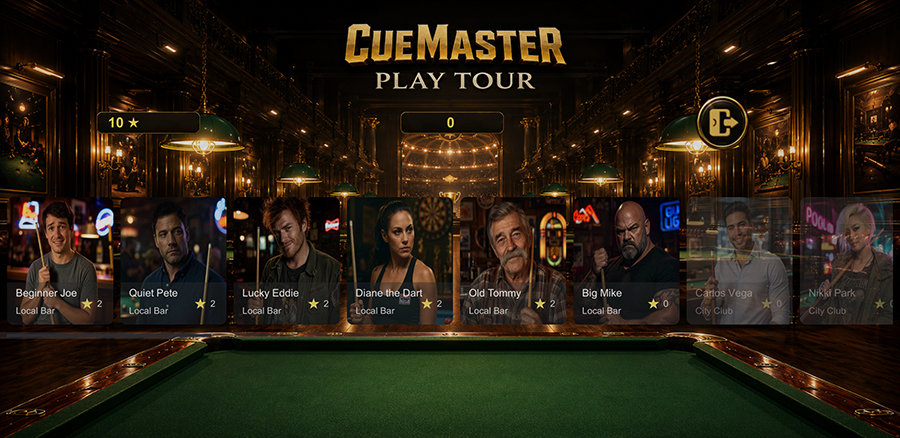
The heart of CueMaster. The Tour is a structured 5-tier ladder of AI opponents, each tier representing a venue from the local neighborhood bar all the way up to the prestigious championship hall. Within each tier, five regular opponents await your challenge, followed by a tier boss who unlocks the next venue when defeated. Every match in the Tour contributes to your overall progression, accumulating stars that gate higher tiers and trophies that demonstrate your mastery.

Tournament Mode

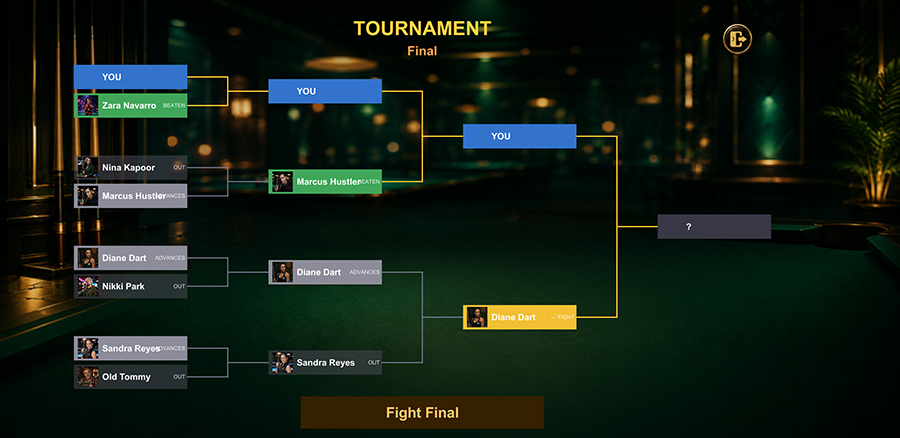
For players who want a higher-stakes experience, every tier features tournament brackets — Quarterfinal, Semifinal, and Final. Winning the bracket grants a championship trophy and significant coin rewards. Losing the bracket doesn't lose your Tour progress, but the next attempt costs an entry fee, adding genuine tension to the championship climb.

Quick Play vs AI

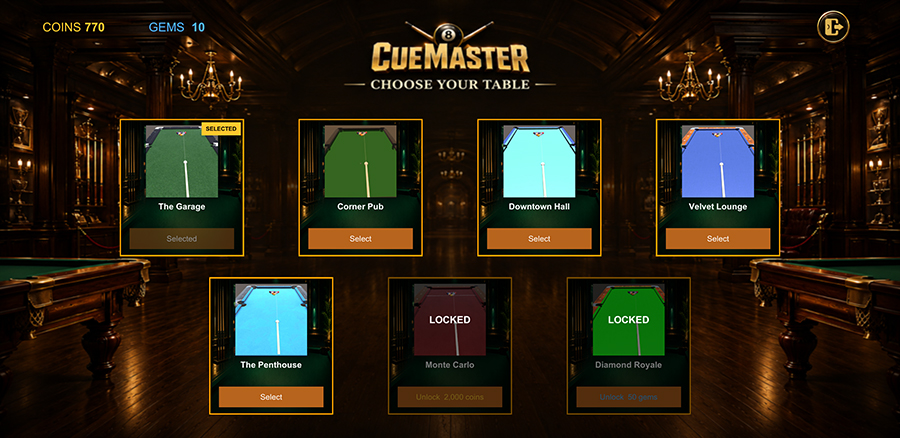
For when you just want to shoot some balls without the structure of the Tour. Pick a difficulty, pick a venue, and play. Good for sharpening specific skills (long pots, bank shots, safety play) without the pressure of progression. Perfect for the 5-minute commute or coffee break.

Play 2 Turns (HotSeat)

Local two-player mode on a single device. Pass-and-play 8 ball with a friend, no internet, no second device, no setup. Great for when someone challenges you to a match in person and you want a quick game.

Practice Shots

Set up specific table configurations and practice the shots you struggle with. Long-rail cuts, bank-the-8, escape safeties — whatever you need to drill, you can drill it without an AI opponent rushing you.

The 5-Tier Tour System Explained

CueMaster's career Tour is the longest, deepest single-player progression of any free 8 ball pool game on Android. Here's how it works.

Tier 1
Local Bar
Friendly regulars and the neighborhood champion. AI plays loose, leaves easy shots. Forgiving introduction to the Tour.
Tier 2
Pool Hall
Hustlers, semi-pros, and regional reputations. AI is competent, plays clean, punishes loose safeties.
Tier 3
City Club
Tournament veterans and ranked players. AI is sharp, calculating, and unforgiving of mistakes.
Tier 4
Championship Hall
Former champions with signature shot styles. AI rarely misses. Bring your A-game.
Tier 5
Hall of Fame
Legends, undefeated streaks, mythic players. AI is near-flawless. The final test.

Six Opponents per Tier

Each of the five tiers contains six unique AI opponents: five regular rivals and one tier boss. The regulars can be challenged in any order, but the boss only unlocks after every regular in that tier has been defeated. The tier itself is fully cleared when the boss falls, which automatically unlocks the next tier and grants a completion bonus — coins, gems, and frequently a new premium cue.

Star Ratings — Earn 1 to 3 Stars per Match

Every match win earns between one and three stars based on three performance factors. Match speed contributes one star if you finish the rack quickly. Shot precision contributes a second star for clean execution without scratching or fouling. Finishing skill — sinking the 8-ball on the first attempt with a clear setup — contributes the third. Stars accumulate across all tiers toward your total stars count, which is the gating signal for advancing through the Tour.

30 Unique AI Personalities

Each opponent in the Tour has their own playing style, dialogue, signature shots, and difficulty profile. Some lean aggressive on the break and falter mid-rack. Some are surgical with safeties and lock you into impossible exits. Some never miss a routine pot but crack under pressure. Beating each one feels different, and replaying them on a higher difficulty surfaces new strategic dimensions of their behavior.

Trophies and Permanent Progression

Completing each tier grants a trophy that's displayed in your profile. Defeating every tier boss completes the Tour and unlocks the Hall of Fame trophy. Star accumulation, trophy collection, total coins and gems earned, and cue/table unlocks all persist permanently — once earned, they're yours.

How to Play CueMaster — Getting Started

From install to first championship win in five minutes.

Step 1: Download from Samsung Galaxy Store

Open the Galaxy Store app on your Samsung device and search for "CueMaster," or follow the direct link to the listing. Tap Install. The download is approximately 85 MB, which on a typical Galaxy device takes 10 to 30 seconds.

Step 2: Launch and Start the Tour

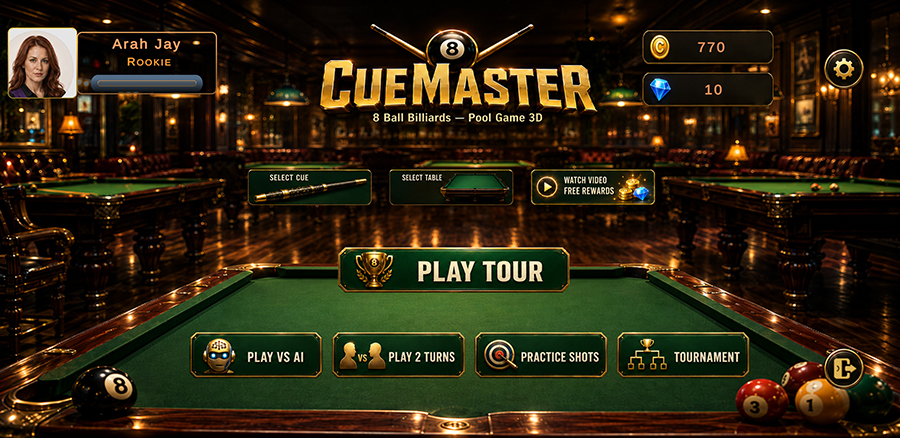
Open CueMaster after installation. The main menu presents you with several options — the most important is "Play Tour," which starts the career mode at Tier 1 (Local Bar) against your first opponent, Beginner Joe. You can also choose Play VS AI, Play 2 Turns, or Practice Shots from this screen.

Step 3: Aim, Adjust, Shoot

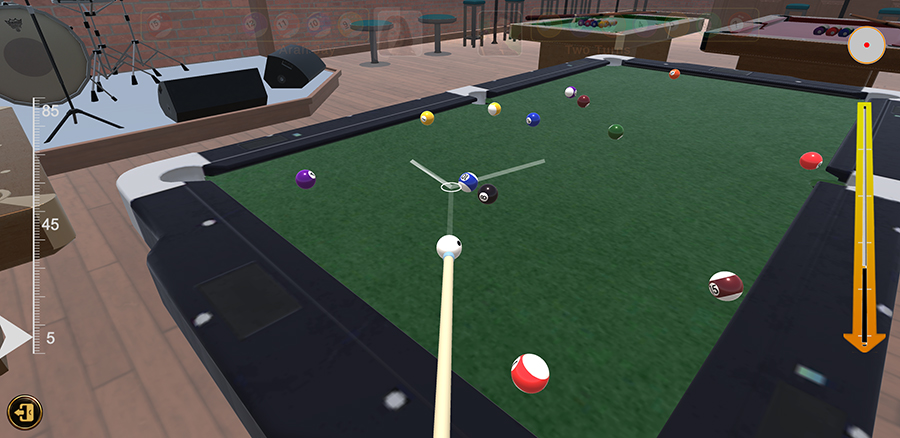
Touch and drag on the screen to aim the cue stick. A trajectory line shows your shot direction and the expected ball path. Use the power slider on the side of the screen to control shot strength — too light and the ball won't sink, too hard and you risk scratching the cue ball. Tap the cue ball indicator in the corner to add spin (English), which controls where the cue ball lands after contact.

Step 4: Win the Rack

CueMaster follows standard 8-ball rules. The first player to sink a ball after the break gets that group (solids 1-7 or stripes 9-15). Sink all your group's balls, then sink the 8-ball cleanly to win. Scratching on the 8-ball loses the match. Pocketing the 8-ball early also loses the match. Standard tournament rules apply throughout.

Step 5: Climb the Ranks

After defeating your first opponent, return to the Tour map. The next opponent unlocks automatically. Defeat all five regular opponents in Tier 1 to unlock the boss match (Old Tommy). Beat Old Tommy to unlock Tier 2 (Pool Hall). Continue across five tiers to become the CueMaster champion of the Hall of Fame.

CueMaster Screenshots

A visual tour of CueMaster's gameplay, career Tour, tournaments, and rewards. Swipe through to see the game in action.

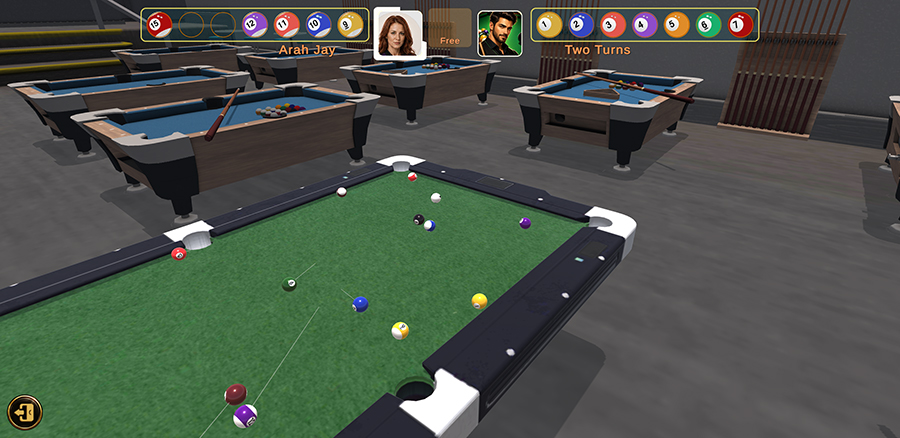
CueMaster gameplay screenshot — cue stick aimed at the cue ball with the 8-ball rack visible on a 3D pool table in a luxurious pool hall
Realistic 3D Pool Physics. Authentic ball spin, English, bank shots, and table friction modeled at simulation level.
CueMaster Tour map showing 5-tier career progression with 30 AI opponents across local bar, pool hall, city club, championship hall, and hall of fame venues
Career Tour — 5 Tiers, 30 Rivals. Climb from the Local Bar all the way to the Hall of Fame across five tiers of escalating challenge.
CueMaster tournament bracket showing quarterfinal, semifinal, and final rounds in offline 8 ball pool tournament mode
Tournament Brackets. Quarterfinal, Semifinal, Final. Win the bracket and claim the tier championship trophy.
CueMaster rival profile screen displaying AI opponent personality, signature playing style, and difficulty rating in the offline 8 ball pool game
30 Unique AI Personalities. Each rival has their own playing style, signature shots, and difficulty profile.
CueMaster star rating reward screen showing 3 stars earned after winning an 8 ball pool match with speed, precision, and finishing skill bonuses
Star Rating System. Earn 1 to 3 stars per match based on speed, precision, and finishing skill. Stars unlock the next tier.
CueMaster rewards menu with daily login bonus, lucky wheel spin, free reward video, and coin and gem economy for the offline pool game
Generous Reward Economy. Coins, gems, trophies, and unlockable cues — no aggressive monetization, no paywalls.

↔ Swipe horizontally to browse all screenshots

Why an Offline 8 Ball Pool Game Matters

Almost every mobile pool game in the top charts requires a constant internet connection. CueMaster doesn't. Here's why that matters.

Play Anywhere — Genuinely

Most "mobile pool games" promote themselves as portable, but try opening them on a flight, on the subway, in a basement, in a rural area, or anywhere with weak signal — they fail to load, freeze on the loading screen, or pop up "connection lost" errors mid-match. CueMaster works in airplane mode, in the deepest underground transit station, on a transatlantic flight, or at a cabin with no cell service. The game runs entirely on your device.

No Data Charges

Online pool games consume mobile data continuously, pinging matchmaking servers, syncing leaderboards, loading ads in real-time, and validating purchases. If you're on a metered plan or traveling internationally, this can cost real money. CueMaster uses zero data after the initial install — every game is local, every save is local, every reward is local.

No Server Outages

Online games depend on their publisher's server infrastructure. When Miniclip's servers go down — which happens — you can't play 8 Ball Pool, no matter how much progress you've made. CueMaster has no servers to depend on. If your phone works, the game works.

Faster Match Starts

Online pool games match you with a remote opponent, which takes 5 to 30 seconds depending on your region and the game's player count. CueMaster spawns an AI opponent instantly. Five matches in the time it takes online competitors to load one.

No Cheaters

Online pool games are notorious for cheaters using aim-bot hacks, time-extension exploits, and modified clients. Single-player offline play removes that entire problem class. The AI opponents are challenging because they're skilled, not because they're cheating.

Your Progress Is Permanent

Online games hold your save data on their servers. If their server crashes, if their company is acquired and shut down, if you're banned for whatever reason, your progress evaporates. CueMaster saves locally to your device. Your progress is yours, period.

CueMaster vs Other 8 Ball Pool Games

How does CueMaster compare to other popular pool games on Android? A side-by-side look at the features that matter most.

Feature CueMaster Typical Online Pool Game
Plays offline (no internet) ✓ Yes ✗ No
Free to install ✓ Yes ✓ Yes
Mandatory login required ✓ No ✗ Yes (Facebook/Google)
Career/Tour progression mode ✓ 5 tiers, 30 opponents ✗ Limited or absent
Aggressive IAP / paywalls ✓ None ✗ Common
Realistic 3D physics ✓ Yes ✓ Yes
Tournament brackets ✓ Yes ✗ Online-only events
Local two-player mode ✓ Yes (HotSeat) ✗ No
Data usage during play ✓ Zero ✗ Continuous
Risk of cheaters/hackers ✓ None (single-player) ✗ Common
Optimized for Samsung Galaxy ✓ Yes ✗ Generic Android

The takeaway: if you want competitive online play and don't mind the trade-offs, online pool games have their place. If you want a deep, satisfying, complete single-player experience that you can play anywhere — without worrying about connections, data charges, cheaters, or login walls — CueMaster is the better fit.

Optimized for Samsung Galaxy

CueMaster is designed specifically for Samsung Galaxy phones and tablets.

Samsung Galaxy devices span a huge range of hardware — from the entry-level Galaxy A04 with 3GB of RAM up to the Galaxy S24 Ultra with 12GB and a high-refresh-rate display. CueMaster adapts to that full range, with auto-detected graphics quality that ensures smooth gameplay across the entire Galaxy lineup.

Supported Galaxy Devices

CueMaster runs well on the following Samsung Galaxy device families:

Adaptive Graphics Quality

On first launch, CueMaster auto-detects your device's capabilities and selects a graphics quality preset. High-end Galaxy devices get bloom, color grading, and atmospheric vignette enabled for a cinematic look. Lower-end devices get a streamlined render path that preserves frame rate and minimizes battery drain. You can override the auto-detection in Settings at any time.

Battery and Storage

CueMaster is designed for efficiency. The install is approximately 85 MB. A typical match consumes about 1-2% of a Galaxy S24 battery on default settings. Saves are around 50 KB and stored locally — no cloud storage required.

Tips for Climbing the Tour

Some strategic advice for players new to the Tour, or returning players looking to clear higher tiers faster.

Tier 1: Learn the Spin

The Local Bar opponents play loose and forgive mistakes, which makes them perfect for practicing cue ball control. Spend time learning how English (side spin), top spin, and back spin affect the cue ball's position after contact. This skill becomes essential at higher tiers where leaving yourself an open shot determines whether you sink the next ball or hand the table to your opponent.

Tier 2-3: Master Safety Play

Mid-tier opponents (Pool Hall, City Club) play sharp offensive pool but are vulnerable to defensive maneuvers. Don't be afraid to play a safety — intentionally leaving the cue ball in a hostile position for your opponent — when you don't have a clean offensive shot. A well-placed safety can swing momentum in matches against the boss.

Tier 4-5: Earn Every Star

At higher tiers, simply winning isn't enough — you need three-star wins to keep pace with the unlock requirements. Focus on three things: speed (don't dawdle), precision (no scratches), and finishing (sink the 8 on the first try). Replay opponents you've already defeated if your star count is short.

Reading AI Personalities

Each AI opponent has tells. Aggressive opponents take risky shots; play tight defense and capitalize on their misses. Defensive opponents lock you into safeties; develop escape shots from awkward positions. Some opponents tilt under pressure (lose focus when behind); take an early lead and they'll fall apart. Reading the personality matters more at higher tiers.

Use the Practice Mode

Don't grind matches against the Tour to learn — use Practice Shots mode to drill specific scenarios. Long-rail cuts, the bank-the-8 escape, the off-the-rail-into-the-corner shot. Practice rewards transfer directly into Tour wins.

Frequently Asked Questions

Common questions about CueMaster's gameplay, installation, and features.

Is CueMaster really free to play?

Yes. CueMaster is completely free with optional advertisements. There are no mandatory in-app purchases, no paywalls blocking progression, and no required login. You can play through the entire 5-tier career Tour without spending money.

Does CueMaster require an internet connection?

No. CueMaster is a fully offline 8 ball pool game. You can play on flights, in airplane mode, with no signal, or anywhere without Wi-Fi. Your progress is saved locally to your device and persists across sessions.

What devices does CueMaster support?

CueMaster supports Samsung Galaxy phones and tablets running Android. The game is optimized for the Galaxy S, Note, Z Flip, Z Fold, and A-series device families. Minimum requirements are roughly equivalent to a Galaxy A50 — 3GB RAM and OpenGL ES 3.1 or Vulkan graphics support.

How many opponents are in the Tour mode?

There are 30 unique AI opponents across 5 tiers — 6 opponents per tier including a boss at the end. Each opponent has their own personality, playing style, and difficulty curve, from forgiving locals in Tier 1 to flawless legends in Tier 5.

How does the star rating system work?

After each match win, you earn between 1 and 3 stars based on three factors: match speed, shot precision, and finishing skill. Faster, cleaner wins with more decisive finishing earn more stars. Stars accumulate across the Tour and unlock the next tier.

Can I play tournaments in CueMaster?

Yes. CueMaster features full tournament brackets — Quarterfinal, Semifinal, and Final — within the career Tour. Winning the bracket grants the tier championship and unlocks additional rewards. Losing the tournament does not lose your Tour progress; you can attempt the bracket again.

Are there in-app purchases?

CueMaster is free-to-play with optional advertisements as the primary monetization. There are no mandatory in-app purchases required to progress, unlock content, or compete with the AI opponents. You can complete the entire game without spending money.

Does CueMaster have realistic pool physics?

Yes. CueMaster uses an authentic 3D physics simulation that accurately models cue ball spin, English (side spin), bank shots, ball collisions, and friction on the felt. Players who understand real-world pool technique will find the same techniques work in-game.

Is my progress saved if I close the app?

Yes. Tour progress, star ratings, defeated opponents, coin and gem totals, and tier unlocks are all saved locally to your device after every match. Closing the app, force-killing it, or losing battery does not lose your progress. Uninstalling the app does delete the save data.

Is CueMaster suitable for children?

CueMaster has an Everyone content rating. There is no violence, profanity, sexual content, or gambling. The game features billiards gameplay only. Parents should be aware that the game does display third-party advertisements as part of the free-to-play model.

How do I unlock new cues?

New cues are unlocked as you complete each tier of the career Tour. Completing all opponents in a tier (including the boss) grants a new cue. Premium cues can also be purchased with the gems you earn from winning matches and tournaments.

Where can I download CueMaster?

CueMaster is available exclusively on the Samsung Galaxy Store. You can download it directly here or by searching for "CueMaster" in the Galaxy Store app on your Samsung Galaxy device.

Ready to Master the Cue?

Free. Offline. Single-player. No login walls, no paywalls, no compromises.

▼ Download Free on Galaxy Store