Need for Speed Carbon Save Editor 1.27 — Free Download & Complete Guide 2026 Description:
Unlock cars, change money, edit alias, repair corrupt saves.
Need for Speed Carbon Save Editor — Free Download
Free savegame editor for Need for Speed Carbon (2006). Unlock cars, modify money, edit alias, repair corrupt saves, and bypass career progression. Created by CoDe RiPPeR.
⬇ Download NFS Carbon Save EditorWhat Is the Need for Speed Carbon Save Editor?
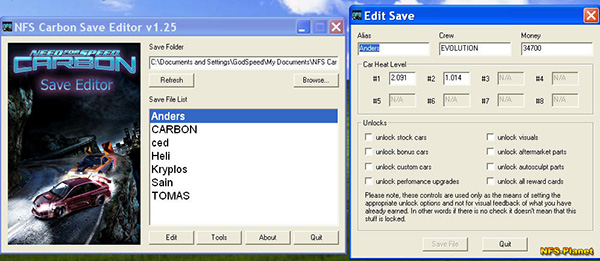
The Need for Speed Carbon Save Editor (also known as NFS Carbon Save Editor or NFSC Save Editor) is a free Windows tool that lets you modify the savegame files of Need for Speed: Carbon — the 2006 EA racing game. With this editor, players can change in-game money, unlock cars and parts, edit their alias and crew name, adjust heat levels on individual cars, repair corrupt saves that won't load, and bypass career mode progression.
The editor was created by community modder CoDe RiPPeR and has been distributed across the NFS modding community for years. It's the standard tool for NFS Carbon save manipulation — used by players who want to customize their experience, recover broken saves, or experiment with different gameplay configurations without grinding through career mode.
What You Can Do With the Save Editor
💰 Modify Money
Set your in-game money to any amount. Skip the grind for buying cars and upgrades.
🚗 Unlock All Cars
Unlock every car in the game including high-end vehicles, plus all car parts and customizations.
👤 Change Alias
Edit your driver name (alias) and crew name without starting a new career.
🔥 Adjust Heat Levels
Increase or reduce police heat on any car you own. Great for managing pursuit difficulty.
🏁 Unlock All Races
Bypass progression locks. Access all races, territories, and career events instantly.
🛠 Repair Corrupt Saves
Recover save files that won't load due to corruption. Often more useful than starting over.
📊 Edit Statistics
Modify race wins, territories owned, reputation, and other statistics tracked in your save.
🎨 Vinyls & Customization
Unlock all vinyls, decals, and customization options for car aesthetics.
How to Install and Use the Save Editor
NFS Carbon folder from Documents to a backup location. This way, if something goes wrong, you can restore your original saves.
Installation
- Download the save editor using the download button above. The file is 461 KB — quick to download.
- Extract the ZIP file using Windows built-in extractor, 7-Zip, or WinRAR. The editor is portable — no installation needed.
- Run the executable by double-clicking. On Windows 10/11, you may need to confirm the security prompt since this is an unsigned older application.
- Optional: create a desktop shortcut for easy access if you'll use the editor often.
Editing Your Save File
- Back up your saves by copying the entire
NFS Carbonfolder fromDocumentsto a safe location. This is your insurance policy. - Launch the save editor. The editor scans your NFS Carbon save folder and lists all profiles it finds.
- Select your game profile from the list. Each profile (alias) shows separately.
- Click "Edit" or "Tools" to open the modification interface.
- Make your changes: set money amount, unlock cars, change alias, modify other values.
- Save changes using the editor's save button.
- Launch Need for Speed Carbon and load the profile you edited. Your changes appear immediately.
Where Need for Speed Carbon Saves Are Stored
NFS Carbon stores saves in your Windows user documents folder. Understanding this helps with backups and troubleshooting:
| Save folder location | %USERPROFILE%\Documents\NFS Carbon\ |
|---|---|
| Profile folder format | A[YourAlias] — e.g., ADriv3r |
| Save file name | Same as profile folder name (with leading A) |
| Multiple profiles | Each alias gets its own subfolder |
| Backup approach | Copy the entire NFS Carbon folder |
The 'A' prefix on profile folders and files isn't random — it's a marker the game uses to identify save data. Don't rename folders or files manually as the game won't recognize them.
System Requirements
| Operating System | Windows XP, Vista, 7, 8, 10, 11 (32-bit or 64-bit) |
|---|---|
| Processor | Any modern CPU — minimal requirements |
| Memory (RAM) | Minimal — under 50 MB used |
| Disk Space | 461 KB for editor, plus space for backups |
| Required Game | Need for Speed Carbon (any edition: standard or Collector's Edition) |
| .NET Framework | Required (typically pre-installed on Windows 7+) |
| Privileges | Read/write access to your Documents folder (standard user is sufficient) |
Compatible Game Versions
The save editor works with all retail versions of Need for Speed Carbon:
- Need for Speed Carbon (standard 2006 release)
- Need for Speed Carbon Collector's Edition (with extra cars, vinyls, and content)
- Need for Speed Carbon: Own the City — separate game, NOT compatible with this editor (different save format)
- Steam, Origin, EA Play, retail DVD versions — all work as they share the same save format
About Version 1.25 vs 1.27
Version 1.25 is the version distributed on Softlookup. CoDe RiPPeR also released a 1.27 update with minor improvements. Honest comparison:
| Feature | Version 1.25 | Version 1.27 |
|---|---|---|
| Core editing | All features work | Same features |
| Collector's Edition support | Mostly compatible | Better handling of CE-specific cars |
| Modern Windows compatibility | Works on Windows 7-11 | Slightly improved |
| Bug fixes | — | Minor fixes from 1.25 |
| Stability | Stable | Marginally more stable |
For most users, version 1.25 works perfectly fine. If you encounter specific issues with 1.25 (especially with the Collector's Edition), the 1.27 update may resolve them.
Common Use Cases
Skipping the Career Mode Grind
NFS Carbon's career mode is fun but can feel repetitive on replay. The save editor lets returning players jump past the grind and access all content immediately. Set money high, unlock all cars, and play the races you actually want to play without the progression treadmill.
Recovering Corrupt Saves
One of the most legitimate uses. NFS Carbon save corruption can happen due to crashes, power loss during saves, or hardware issues. Sometimes saves become unloadable. The editor can often repair these saves or extract enough data that you don't have to start completely over.
Cinematic Mode and Modding
Modders use the editor to set up specific game states for screenshots, video recordings, or testing other mods. Need a specific car at a specific heat level for a chase scene? The editor lets you set that up in seconds.
Trying Different Approaches
Some players use the editor to experiment with game design — what would Carbon be like with infinite money? With every car unlocked from the start? With maximum heat at all times? The editor enables creative play that the base game doesn't.
Helping Speedrunners
The NFS Carbon speedrunning community uses the save editor for category practice. The Speedrun.com NFS Carbon page lists this tool as a community resource for setting up specific save states.
Tips for Best Results
- Always back up first. Copy your entire NFS Carbon folder before any editing. Five seconds of backup beats hours of recovery work.
- Make changes incrementally. If you're trying many modifications, change one or two at a time and verify they work before making more changes. Easier to identify what broke if something does.
- Don't edit while the game is running. Close NFS Carbon completely before launching the editor. The game caches save data and won't see your changes if it's running.
- Note your alias before editing. If you change your alias and the game can't find your save afterwards, you'll need to remember the original name to fix it.
- Don't go crazy with money. Setting money to absurdly high values (billions) sometimes causes display issues. Stick to reasonable amounts (under 100 million) for stability.
- Test on a copy first. If you're nervous, copy a save to a different profile name and test your changes there before applying to your main save.
Troubleshooting
Editor doesn't find my profile
Check that NFS Carbon is properly installed and that you've played at least once to create a profile. The editor scans Documents/NFS Carbon/ for profile folders. If your profile is in a different location (custom installations sometimes redirect this), you may need to manually point the editor to the folder.
Changes don't appear in-game
Make sure you saved the edits in the editor before launching the game. Also verify you're loading the profile you actually edited — easy to confuse profiles if you have several. Restart NFS Carbon completely; some changes only appear after a fresh game launch.
Game crashes after editing
This usually means an invalid value was set. Restore your backup and try the changes again, more conservatively. Avoid extreme money values, don't unlock cars that may not exist in your game version, and verify your alias hasn't been corrupted.
Can't run the editor on Windows 11
Right-click the executable → Properties → Compatibility → check "Run this program in compatibility mode for Windows 7" or "Windows XP." Apply and try again. Some older modding tools need compatibility mode on modern Windows.
Antivirus flags the editor
Some antivirus programs flag save editors and game modding tools as potentially unwanted programs (PUPs). This is typically a false positive — the tool only modifies your local game saves. Verify you downloaded from a trusted source (like Softlookup), then allow the file in your antivirus if you trust it.
Legal and Ethical Considerations
Using save editors for single-player games is generally accepted in the gaming community. NFS Carbon is now nearly 20 years old — its original online services have been discontinued, EA isn't actively monitoring or enforcing anything around the game, and modding the offline experience is widely accepted practice.
- Single-player only: The editor only affects your local saves. There's no online component to violate.
- EULA technicalities: Strict reading of EA's old EULA may forbid modification, but enforcement is non-existent and the modding community has operated openly for years.
- Don't redistribute saves with personal data: If you share modified saves with others, make sure they don't contain personal information (alias names if those identify you, etc.).
- Don't claim record times made with edited saves: Speedrunning communities require unmodified gameplay for legitimate records. Practice with editor saves is fine; submitting them as records is not.
Alternatives and Related Tools
Several other Need for Speed Carbon modding tools exist alongside this save editor:
| Tool | Purpose | When to Use |
|---|---|---|
| NFS Carbon Save Editor 1.27 | Updated save editor | If 1.25 has compatibility issues |
| NFSC-SavePatcher | Add custom cars to existing saves | For installing modded car packs |
| NFS Carbon trainers | Real-time game cheats | Cheats during gameplay rather than save editing |
| Widescreen Fix | Modern resolution support | Playing on modern monitors and 4K displays |
| Texture mods | Visual upgrades | Modernizing the game's visuals |
Frequently Asked Questions
What is the Need for Speed Carbon Save Editor?
A free Windows tool created by CoDe RiPPeR that lets you modify Need for Speed Carbon savegame files. Change money, unlock cars, edit alias, adjust heat levels, repair corrupt saves, and bypass progression locks.
Is the NFS Carbon Save Editor safe to use?
Yes when downloaded from reputable sources. The application has been tested clean of viruses and malware. However, save editors directly modify save files — changes are permanent. Always back up before using.
How do I install and use the save editor?
Download the 461 KB ZIP, extract anywhere, and run the executable. No installation needed. Back up your NFS Carbon Documents folder first, then launch the editor, select your profile, click Edit, make changes, save, and launch the game.
What can I modify with the save editor?
In-game money, unlocked cars and parts, alias and crew name, heat levels on owned cars, race progression, vinyls and customization, statistics, and corrupted save files (for repair).
Will using the save editor get me banned?
No. NFS Carbon is primarily single-player and the original online services have been discontinued. The save editor only modifies local files — there's nothing to ban from in 2026.
Can I revert changes made by the save editor?
Not directly — modifications are permanent. With a backup of your NFS Carbon folder before editing, you can restore the original saves. This is why backing up first is essential.
Where are NFS Carbon save files stored?
In Documents/NFS Carbon/A[YourAlias]/ on Windows. Each profile gets its own subfolder. Back up the entire NFS Carbon folder before editing.
What's the difference between version 1.25 and 1.27?
Both versions handle core editing functions identically. 1.27 has minor improvements for Collector's Edition compatibility and modern Windows. For most users, 1.25 works perfectly.
Does the editor work with the Collector's Edition?
Yes. Both standard NFS Carbon and Carbon Collector's Edition use the same save format and work with this editor. Collector's Edition specific cars are also supported.
Software Information
| Software Name | Need for Speed Carbon Save Editor |
|---|---|
| Also Known As | NFS Carbon Save Editor, NFSC Save Editor, NFS Carbon Unlocker |
| Author | CoDe RiPPeR (community modder) |
| Category | Game Tools and Editors |
| License | Freeware |
| Version | 1.25 |
| Operating System | Windows XP, 7, 8, 10, 11 |
| File Size | 461 KB |
| Required Game | Need for Speed Carbon (2006) |
| User Rating | 5/5 (234 reviews) |
| Languages | English |
Related Software on Softlookup
Software entry last updated: April 27, 2026.
Conclusion
To conclude Need for Speed Carbon Save Editor 1.27 — Free Download & Complete Guide 2026 works on Windows operating system and can be easily downloaded using the below download link according to Freeware license. The download file is only 100 KB in size.Need for Speed Carbon Save Editor 1.27 — Free Download & Complete Guide 2026 was filed under the Tools and Editors category and was reviewed in softlookup.com and receive 5/5 Score.
Need for Speed Carbon Save Editor 1.27 — Free Download & Complete Guide 2026 user Review
Please review Need for Speed Carbon Save Editor 1.27 — Free Download & Complete Guide 2026 application and submit your comments below. We will collect all comments in an effort to determine whether the Need for Speed Carbon Save Editor 1.27 — Free Download & Complete Guide 2026 software is reliable, perform as expected and deliver the promised features and functionalities.Popularity 10/10 - Downloads - 8679 - Score - 5/5
| Category: | Tools and Editors |
| Publisher: | EA Games |
| Last Updated: | 04/27/2026 |
| Requirements: | Not specified |
| License: | Freeware |
| Operating system: | Windows |
| Hits: | 1213 |
| File size: | 100 KB |
| Price: | Not specified |
| Name: * |
E-Mail: * |
| Comment: * |
|