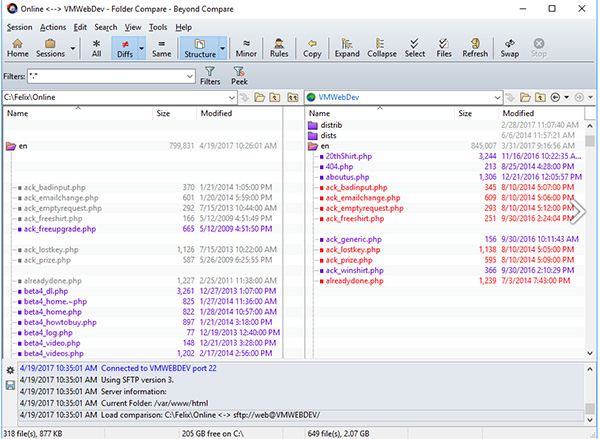
Beyond Compare 4 is a powerful file management and comparison tool that can quickly and conveniently compare differences between files is a good skill to have in both professional and personal use.
About Beyond Compare 4
Beyond Compare 4 is the ideal tool for comparing files and folders on your Windows system. Visualize changes in your code and carefully reconcile them.
- Compare Files, Folders
Beyond Compare allows you to quickly and easily compare your files and folders. By using simple, powerful commands you can focus on the differences you're interested in and ignore those you're not. You can then merge the changes, synchronize your files, and generate reports for your records. - Specialized Viewers
Beyond Compare includes built-in comparison viewers for a variety of data types. Compare .csv data or HTML tables in a Data Compare session, or images in a Picture Compare session. - 3-way Merge
Beyond Compare's new merge view allows you to combine changes from two versions of a file into a single output. Its intelligent approach allows you to quickly accept most changes while carefully examining conflicts. - Synchronize Folders
Beyond Compare's intuitive Folder Sync interface lets you reconcile differences in your data automatically.
Beyond Compare is focused. Beyond Compare allows you to quickly and easily compare your files and folders. By using simple, powerful commands you can focus on the differences you're interested in and ignore those you're not. You can then merge the changes, synchronize your files, and generate reports for your records.
COMPARE FILES, FOLDERS
You can compare entire drives and folders at high speed, checking just sizes and modified times. Or, thoroughly verify every file with byte-by-byte comparisons. FTP sites, cloud storage, and zip files are integrated seamlessly, and powerful filters allow you to limit what you see to only what you're interested in.
Once you've found specific files you're interested in, Beyond Compare can intelligently pick the best way to compare and display them. Text files can be viewed and edited with syntax highlighting and comparison rules tweaked specifically for documents, source code, and HTML. The text contents of Microsoft Word .doc and Adobe .pdf files can also be compared but not edited. Data files, executables, binary data, and images all have dedicated viewers as well, so you always have a clear view of the changes.
3-WAY MERGE Pro edition only
Beyond Compare's merge view allows you to combine changes from two versions of a file or folder into a single output. Its intelligent approach allows you to quickly accept most changes while carefully examining conflicts. Color coding and section highlighting allow you to accept, reject, or combine changes, simply and easily. When merging files you can change any line in the output with the built-in syntax-highlighting editor. By using Beyond Compare's powerful file type support and ability to favor changes from one file, you can trivially accept many changes without even seeing them.
You can use Beyond Compare directly from most version control systems, giving you all of the powerful comparing and merging support you need when you need it most. Integrated source control commands are also available, allowing you to check in and check out files without interrupting your work.
SYNCHRONIZE FOLDERS
Beyond Compare's intuitive Folder Sync interface lets you reconcile differences in your data automatically. You can efficiently update your laptop, backup your computer, or manage your website, and Beyond Compare will handle all the details. You can copy to and from disks, FTP servers, and zip files, all using the same interface. Anything you don't want affected can be easily filtered out, and all of the powerful comparison techniques are available, making the backup as fast or robust as you need.
MAC OS X VERSION
At long last, Beyond Compare runs natively on Macs!
BC for Mac has all the power and functionality you've come to expect from Beyond Compare, now with native look and feel, speed, and enhancements to make it feel at home.
Beyond Compare MAC OS X version
Beyond Compare runs on
Windows 10/11
and is available under the
Shareware
license
— the installer is 21.7 MB.
We’ve catalogued it under
Backing Up.
Help fellow users decide. Share your experience with Beyond Compare.