Autodesk ImageModeler 2009 offers architects, designers and entertainment content creators a
new approach to 3D modeling; by generating 3D models from 2D digital images or
panoramas.
ImageModeler 2009 Download
Using advanced technology, Autodesk ImageModeler 2009 extracts 3D information
from still images to construct accurate 3D models and scenes with highly realistic
textures automatically applied.
The software also delivers a number of productivity-
enhancing features including a rules toolset that enables you to make point-to-point
measurements, and a mapping feature that allows you to define how each texture will
be created. Additionally, Autodesk ImageModeler 2009 offers support for Autodesk® 3ds Max®
Autodesk® Maya® and AutoCAD® software.
How ImageModeler works
Typically, to create a 3D model of an object from photos, the object to be modeled
should be shot from different viewpoints. By identifying common characteristics on
the object in each of the images displayed, you provide the software with the
information that it needs to automatically calculate the position, the orientation, and
the characteristics of the camera (or cameras) used to take the photos. Autodesk ImageModeler
can then retrieve the spatial coordinates of any 3D element from its projections within
two images at least.
If you are creating a model from a single image only, you can define the angles and
perspectives in the shot so that Autodesk ImageModeler can calibrate spatial coordinates from
the single image.
By means of the 3D points rebuilt by triangulation, or using the image(s) as visual
guides, Autodesk ImageModeler enables you to create polygon-based 3D meshes. Textures
extracted automatically from the images and mapped on to the model keep the realism
of the original photos. You can also edit and modify these textures manually. Finally,
export the resulting model to compositing, animation or CAD software, for further
enhancement and animation or for use in web application.
ImageModeler Guide
Autodesk ImageModeler can be used for modeling scenes or buildings for architectural
purposes, for calculations and 3D surveys from photographs, for creating 3D virtual
visits and fast creation of photo-realistic backdrops, for human modeling, for
industrial design, for animation and special effects, and for simple creation of photo-
realistic objects for video games.
ImageModeler Architecture
Autodesk ImageModeler 2009 is designed to allow you to model of scenes or buildings “as built”,
create 3D virtual visits, simulate and prototype projects in their final environment,
calculate scenes and 3D surveys from photographs, and match the camera perspective
for overlay of 3D over 2D pictures.
Industrial design
With ImageModeler, you can re-construct existing models from photographs, for
example, create 3D models of a town, and integrate projects into their final
environment. More specifically, ImageModeler is cut out for modeling “as built” and
reverse engineering.
Video games
For the gaming industry, ImageModeler allows fast creation of photo-realistic
environment, human modeling, virtual reality, and 3D virtual visit
photo-realistic scenes
ImageModeler tools allow you to extract texture maps directly from photographs to
produce photo-realistic scenes of these meshes and re-create a scene or an object in 3D
as it is in reality
Integrate projects
Autodesk ImageModeler helps you create photomontages of 3D projects in real environments,
accurately and “at scale”. You can add extensions to existing buildings, a street, a town
by creating your 3D project or extension with your favorite tool (3ds maxTM, REVITTM,
AutoCAD®, etc.), take several photographs of the environment, and then use
ImageModeler to create an accurate photomontage in all pictures at once. The image
below shows a reconstructed archeological site
Measure your scene
Another use of Autodesk ImageModeler is to measure the 3D space from simple photographs.
These measures, which are performed by a simple interaction with the images, do not
require any prior information about the observed scene, or about the cameras that
have been used.
You can use your computer offline to measure 3D distances and angles of real scenes
from simple photographs: objects of any size, buildings, landscapes, far distances,
inaccessible areas, crime scenes, etc.
ImageModeler Workflow
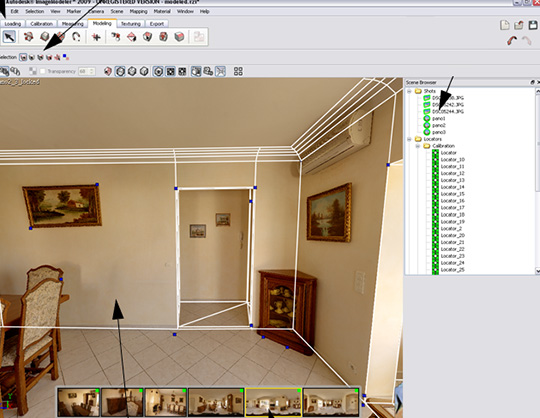
The six-stage workflow is represented in the toolbar. When you select a tab in the
toolbar to enter a new stage of a project, the tools you will need to work with in that
stage of the project are displayed automatically.
Only one tool from the workflow toolbar is activated at a given time and almost all
tools have their own tool properties that appear in the toolbar when you select them.
If the tool properties do not appear when you click on a tool, select Window >
Properties Toolbar.
The workflow is described as follows:
- Load images: When you create a new project, you must select whether you will be
calibrating a single image (either a 360° panorama, or a normal shot) or a set of
images (either a set of normal shots, or a mix of normal shots and panoramas).
Then you load the shot(s) into a new project and create a camera device(s).
NOTE: The calibration tools are different depending on whether you are working
with a single shot or a set of shots. Calibrating a single image or panorama project
uses perspective tools, instead of the location marker tools used in projects
containing multiple shots of different angles of an object.
C alibrate cameras. You define the 3D space for your model from the 2D images
and, if necessary, establish the properties of the camera(s) that were used to capture
the photographs . Select the Calibration workflow tab.
- Measure distances and angles. You can add use a ruler to accurately measure 3D
distances and angles by identifying the corresponding elements in the 2D images.
Create a model. You can create and edit polygonal meshes. Select the Modeling workflow tab.
- Texturing a model. After creating (or importing) a model, you can texture it by
extracting the material from the background 2D images.
ImageModeler 2009 - Full Version runs on
Windows/Vista/7/2000/XP/2003/Windows 10/11
and is available under the
Shareware
license
— the installer is 1000 KB.
We’ve catalogued it under
Debugging and Tracing.
Help fellow users decide. Share your experience with ImageModeler 2009 - Full Version.