Web based School
Setting Up an ActiveX Web Site |
 |
 |
Chapter TenSetting Up an ActiveX Web SiteUntil now, we have approached the Internet from a
user's perspective and, to some extent, from a programmer's perspective. In this section
we'll take a more holistic approach and view it from a Web site administrator's
perspective. The ActiveX features were, after all, designed with
a focus on empowering the Web site administrator. ActiveX allows the administrator to
command "Give me this and that" and for the programmer to respond with,
"How high and when?" Knowing the parts and pieces with which the administrators
are working will help the programmers provide them with better tools. In this chapter you will be introduced to some of
the requirements for operating Web and other Internet servers. I will focus on three major
pieces of a Web site and what ingredients go into them, and will discuss how they relate
to ActiveX programming. These pieces include
System RequirementsWhen setting up a system to access the Internet, you
will need a certain mix of hardware and software, installed and configured to meet your
specific purposes. To determine this mix, you first need to know what the purpose
of the Web site is going to be. A site can be set up for several reasons. Every business, of course, can find a commercial
purpose geared to its specific industry. The company could use it to peddle its wares, or
just publish information about its product. Individuals also like to post their own home pages.
Using the Web in this way gives every family (that has access to a computer) an Internet
presence. Folks like to publish the goings-on and interests of their family to keep
friends updated. It's like having your own family newspaper! If you're going to have a dedicated Internet server,
there are certain site-management features you may find important to have. If you're going
to have an office desktop PC, you will want to make sure that it has a Web-browsing and
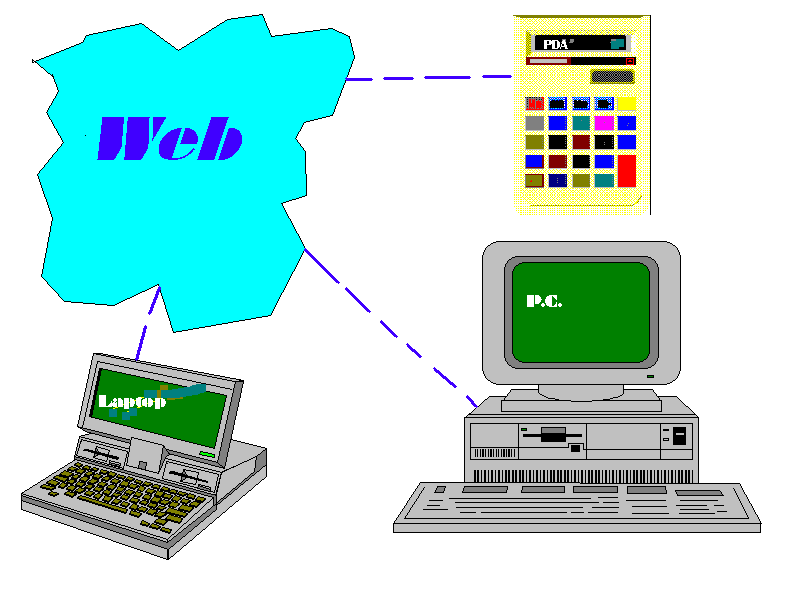
news capabilities. If you're going to have a portable device, like a laptop or PDA
(Personal Digital Assistant), you will probably need scaled-down network services such as
simple e-mail and text browsing.
Figure 10.1. Users will
access your site with a variety of different types of terminals. HardwareThe hardware used for client and server machines,
logically, should be different from each other. This is because their missions are
different. A standard client, like a desktop PC, does not need a dedicated LAN-type
connection to the Internet (but it helps). A standard server, like an HTTP Web server,
will need that dedicated connection, but may not need to be able to make outgoing calls .
The Client System
The most basic of hardware required for any system
is pretty standard stuff—a console (monitor, mouse, keyboard, printer, case, and
power supply) and a CPU (Motorola, Intel, and so on). Although you may be operating your
own servers, you will want to do so through a remote client. You can administer the server
from its console, but remember that the server may be too busy doing other server things
to act effectively as a local terminal as well. Along with the basic box just described, you will
need multimedia hardware (which you probably already have) such as a joystick, sound card,
and high-quality video card and monitor. You can get really carried away with the
multimedia and add MIDI keyboards, radio and television cards, and CD-ROMs—all of
which can be then coordinated through ActiveX programming. Finally, the most important part of the client
system is its network connection. The client can be attached to the Net in a variety of
ways. Modems can be used to access the Internet through a
dial-up account . This type of account usually provides for a dynamically assigned IP
address. Some providers will go as far as to assign dial-up users a static IP address
(usually for an added fee). On standard telephone lines, modems can be used that are rated
in speed from 2400 baud to 14,400 bps. In most areas of the United States, that number can
go as high as 28,800 or 36,600. For additional fees to the ISP and your phone company, you
can use a higher-speed modem and ISDN line to gain access as fast as 57,600 baud.
Besides connecting through a modem, a client may be
hooked up to the Internet through its LAN. This will usually happen in a corporate or
other institutional setting—but hey, it could happen at home, too. With a dedicated connection through a network card,
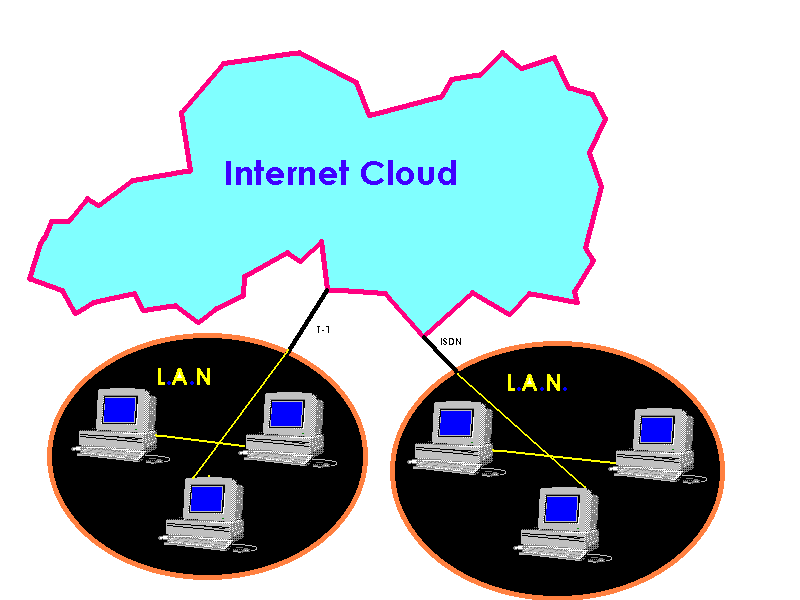
your LAN would probably be hooked up to the Net through a dedicated ISDN or T1 line. As a
rule of thumb, ISDN gives you at least twice the speed of a regular modem, and a T1 will
give you about twice the speed of an ISDN connection. (See Figure 10.2.) Figure 10.2. If you have a
dedicated (i.e., network card) connection, every station on your entire LAN is probably
connected to the Internet. The Server SystemIf your network needs are aimed more toward making
information available rather than retrieving it, your system needs to reflect that
mission. The basic hardware for a server is similar to that
of a desktop machine—a console (monitor, mouse, keyboard, printer, case and power
supply) and a CPU (Motorola, Intel, and so on). That's pretty much where the similarity
stops. Most servers have very little need for multimedia
hardware. Unless the purpose of your server is multimedia-related (such as a RealAudio or
TrueSpeech network), you can get by fine with an 8- or 16-bit sound card, or even no sound
card at all. You will probably want some kind of audio, though,
so that you can hear the alarms when something goes wrong. For the most part, however,
most ActiveX programming does not require any multimedia on the server at all. There are a
few exceptions to the multimedia requirements on Windows NT IIS (Internet Information
Server) systems. Since these systems usually run unattended, they may require no more
multimedia than a CD-ROM - and that to hold the installation disks. You will also want to have plenty of storage and
memory resources. On an Internet server that receives a lot of simultaneous hits, you
should have very fast hard drive access—SCSI (Small Computer Systems Integration)
hard drives are great for this. You should also have an abundance of memory to handle
several instances of several programs working together with some degree of speed. If your
server has to constantly swap between memory and storage, it is going to become bogged
down, and users will time-out. Finally, the most important part of any server is
its network connection. No network, no server. For this reason, an Internet server is
almost always on a dedicated connection (ISDN or T1) to the ISP. This is usually handled
with a network card in the computer case. A cable comes out of this card and goes to a
router that passes the signal on through a T-1 or ISDN and out to the ISP . Server SoftwareWhen you have a computer that is all hooked up to
the Internet, you are ready to start setting up your Internet site or "Net
presence." If you are managing your own server, one of the most
important services you will want to install on your network server is e-mail . Users who
want to send feedback to a Web site administrator will often address their comments to
webmaster@whatever.net (or some such address). To enable these services you will need a POP3 server
and an SMTP server. (See Figure 10.3.) An SMTP server will allow your users to send
e-mail. A POP3 server is used to store incoming mail for your users until they are
ready to retrieve it themselves. The two are usually integrated into one software package.
Figure 10.3. SMTP and POP3
are used to send and receive e-mail.
NewsInternet News (Usenet) is very similar to e-mail.
You compose a message, called an article in NNTP (Network News Transfer Protocol)
lingo, and send it to a server. The recipients then retrieve the article at their leisure.
This is where Usenet and e-mail branch off: You don't specify a recipient for a news
article; you specify a newsgroup to which the article will be posted. The article is then
retrieved by anybody who subscribes to that news group. Now you're a published author!
It is seldom necessary to set up a Usenet news
server—unless you are operating an ISP yourself. Also, in some instances, you may
want to use one to create a public forum to host discussion of a topic relevant to you or
your business. Usenet news servers can be difficult to manage.
Keeping the message counters correct and maintaining a feed with other Usenet hosts can be
quite time-consuming. Also, bandwidth can be used up quickly with the more than 14,000
public newsgroups available to your users.
TransferAnother service you will most certainly find
necessary is FTP (File Transfer Protocol). This will allow you to make ZIP and other files
available for downloading. To make this easy, Windows NT comes with a built-in FTP server.
With it, you can provide anonymous or password-protected access to your FTP server
directories. The anonymous access feature allows all users to access files and
directories. The password-protected feature allows special file privileges to be assigned
to individual accounts. It also has features for enabling various levels of security to
fit a particular need . Web ServerThis is the service that enables users on the Net to
access your Internet site with a Web browser such as Netscape. It is also one of the more
complex of server systems to operate and maintain. Security features must be monitored
and, as with most other servers, the logs must be monitored and user configurations kept
current. Each Web server package available has its own tips,
tricks, and features. All of them enable users to retrieve hypertext documents, and most
even have features for allowing CGI, Perl, or other server-side scripting. Microsoft has introduced its IIS (Internet
Information Server) as a part of Windows NT Server 4.0. This is the first complete ActiveX
Web server released, and allows for such features as ISAPI and Trust Verification as well
as other secure transaction features. As you develop ActiveX applications (both server and
client), you will find the use of an IIS server invaluable in testing and debugging your
processes. Database ServerThe idea of a database server is not new, but only
with the development of ActiveX has it become powerful for everyday users as well as
advanced programmers. Microsoft BackOffice includes SQL Server and is a very powerful tool
for any large or small corporation. dbWeb is a relatively new product from Microsoft that
is designed specifically for enabling database queries and responses by way of the
Internet. If SQL Server is a bit more than you need, there are also more Web-centric
packages such as dbWeb. These enable user interaction with ActiveX databases over a
network. Web Site Administrator Requirements
Basic management of a Web site is relatively safe
and simple. The managing and monitoring of user activity logs and other similar functions
tends to be fairly routine stuff once the server is configured properly. That is
why most ISPs will provide their users with facilities to set up and maintain their own
Web pages instead of forcing them to operate their own Web servers. The tougher issues, like security and directory
structure, are handled by the network administrator, but sometimes even those functions
are handed down to the individual Web site administrators. Technical SkillsThe focus in ActiveX programming is to treat
everything on the Net as a bunch of objects—each having its own properties, methods,
events, interfaces, and so on. The definition of a Web site administrator is expanded
somewhat because of this. Administrators need not be programmers themselves,
but it helps to have access to one to help write client and server scripts. They also need
not be hardware specialists, again, as long as there is one available. Finally, they need
not be certified network specialists—as long as they have access to one. It would seem that a Web site administrator needs to
be a jack of all these trades, but a basic familiarity with ActiveX and OLE is all an
ActiveX Web site administrator needs to have in the way of technical skills. A better
analogy is that the Web site administrator is a conductor, constantly trying to balance
the different parts of his symphony (see Figure 10.4.). The real talent as an ActiveX site
administrator comes in providing content rather than being an engineer. Figure 10.4. ActiveX Web
site administrators coordinate the efforts of a team of technicians (locally and
remotely). HardwareThe hardware for an ActiveX Web site is very much
the same as for any other Web site. The major difference between the two is the use of
interactive multimedia, or active content. ActiveX Web sites will tend to manage
more multimedia content, and for debugging purposes may need some degree of multimedia
capability. An ActiveX Web site administrator is faced with very
few hardware issues. A few of them that one may face include:
SoftwareAn ActiveX Web site administrator needs to be
familiar with the wide variety of different types of Web browsers that will be used to
access his site. This is usually limited to MS Internet Explorer and Netscape, but can
include a great many others. To send files to, and retrieve files from, a Web
site, the administrator will probably need to use an FTP client. If you enable your users
to have FTP access, each user will be able to manage his own accounts, such as WWW and
FTP. Most importantly, you must be familiar, to some
extent, with all the software running on your servers. This is not as important if you are
using your ISP's servers rather than your own. Two times you will definitely want to be
familiar with your ISP's server software are
NetworkingManaging a Web site really does not require a very
in-depth knowledge of networking . In fact, most HTML authors do not know or care much at
all about networking as a technology. They just do it. There are, however, a couple of key
networking features about which you, as an ActiveX programmer, need to be aware.
Figure 10.5. DNS resolves
hostnames to IP addresses and back. When your domain is registered through InterNIC,
other users can connect to you with a relatively easy-to-remember name such as
MyHost.MyDomain.Net instead of having to use a mix of your hostname and your IP address
like MyHost.123.45.67.890.
Network ProtocolsTCP/IP (Transmission Control Protocol/Internet
Protocol) is the language of the Net. It is the protocol used to communicate between
hosts. Whether you use a dial-up, ISDN, Frame Relay, or T-1, you will use TCP/IP. There are a variety of other services that can also
be run on the Net, but these would still use TCP/IP to communicate. Some of the services
that you can run over TCP/IP include SNMP (Simple Network Management Protocol) and any or
all the standard Internet services (FTP, SMTP, HTTP, and so on). Often these services are
referred to, not incorrectly, as protocols. (See Figure 10.6.)
To use these services, you need not know too
much about how they work. However, to program with them using ActiveX controls, you
will want to have a fairly thorough understanding of the respective standard.
Internet Service ProvidersAn Internet Service Provider (ISP) is an
organization that provides a user with a connection to the Internet, usually for a fee.
Most cities have at least one ISP operating locally, and almost every metropolitan area
has more than a dozen small and large providers. Most ISPs can be broken down into two categories:
Usually a provider will offer both commercial and
individual network services, concentrating on one and offering the other on the side.
Selecting an ISPThere are many ways to obtain a connection to the
Internet. There are an even greater number of companies that will help you obtain that
connection. Selecting the right connection for your specific site's needs is key in
maintaining a polished Web presence. To do that you will have to have some sort of
relationship with a local or distant ISP. Because of the anonymous features of the Internet,
it is often difficult to tell what kind of operation an ISP is running until you actually
use its service or visit its shop. For this reason, you will want to physically visit its
facilities and meet their people before you invest much more than the cost of a dial-up
account with them. On the outside, this may seem frivolous. However, one year of dedicated
service can cost upwards of $3000. A few dollars, or even a few hundred dollars, is
well-spent to ensure that you don’t pay for several thousand dollars worth of someone
else’s mistakes. Levels of Service
The level of
service you require is not necessarily a case of "more is better." Very few
people find the Internet useless, but not everybody needs a 10 megabyte-per-second
Ethernet connection. Consider what your current needs are. When a dial-up
connection costs $25 and dedicated access costs $250, you must assess what you truly
require before going big.
Dial-UpIf you are managing a Web site on your ISP's server,
you can do so with as little as a dial-up account. Your ISP will usually provide you with
an FTP site where you can post your Web pages, images, and ActiveX controls and scripts. You should be aware that you can operate a
Web server over a dial-up connection, but only while you are online. When you log off,
your server can no longer process requests from the Net. Dedicated
If you operate your own servers, there are three
major differences from having dial-up service. First, you will not need your ISP's Web
server. Second, you will have a local drive on which to put your Web stuff—you can
set it up for FTP or whatever type of access you desire. Third, and most important, your
Web site will be up as long as your dedicated connection is working. SummaryIn this chapter you have been exposed to some of the
issues confronting ActiveX Web site and network administrators in selecting and working
with an Internet Service Provider. These issues include networking, hardware and software,
and user-specific considerations. You know that both a client and a server system must
have a console with a CPU and a network connection, be it dedicated or dial-up. You also
know that a dial-up connection is not very effective for running server software because
the server will be disconnected whenever the dial-up session is concluded. You have also learned about the different kinds of
services that you may run on your server, such as FTP, News and e-mail. Each service is
designed to fit a particular need, and you need only install the ones you want your users
to be able to access, and which provide the best format for the delivery of your content. You also know about some of the technical skills
required of Web site administrators. Although they need not be specialists in hardware,
software, or networking, they still need a general mix of all of those skills to maintain
their systems. The real focus for the Web site administrator is on the content. Finally, you learned a little about how to select an
ISP by visiting its site and selecting a level of service. Q&A
Workshop
Develop a brief plan of a Web site for a real or
fictional company. Show the directory structure and which standard and ActiveX servers you
would use. Identify what personnel are needed to develop and maintain the site. Quiz
|
|
|
Popular Tutorials
-
 MS Access
1109
MS Access
1109
-
 C++
1222
C++
1222
-
 HTML
584
HTML
584
-
 JavaScript
616
JavaScript
616
-
 Vbscript
873
Vbscript
873
-
 Oracle
473
Oracle
473
-
 VC++
875
VC++
875
-
 SQL
2959
SQL
2959
-
 XML
514
XML
514
-
 Java
814
Java
814
-
 Perl
455
Perl
455
-
 Linux
451
Linux
451